Worms United
The Unofficial Download Homepage
Everything you need to know to get Worms 2 woking at it's best
can be found below, I've also got instructions on how to create your
own personal sample sets.
- Worms 2
- Sounds
- That hasn't helped!
Worms 2
- What do I need to play Worms2?
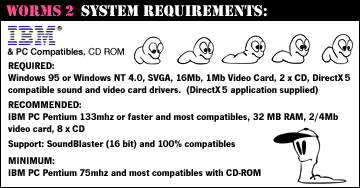
- Is there a Worms 2 demo I can play?
Yes. You can download it from the Team17's
FTP site.
- Where can I buy Worms 2?
Worms 2 is available in the original English version
from the Team17
Shop for £6
or you can try doing a search
at eBay for Worms 2. I found a copy for 2 quid when
I last checked.
Sounds
- How do I add custom sample sets to Worms 2?
Each sample set is contained in its own folder in WORMS/DATA/WAV/SPEACH/.
Unzip your files into this directory, making sure you include
the folder. The name of the folder is the name that will
appear in the game.
- How do I use a custom sample set in Worms 2?
Custom samples can only be used in the single or multi
player games. The QuickStart games use the default samples.
When you are at the 'Team Selection' menu, right click on
your current team (They must be in the bottom window, if
the team is in the 'Player roster' click the team again
to move them). Click on the drop down menu to select the
samples to use with the team.
- Where can I get custom sample sets?
You can get thousands of custom sample sets from the internet.
There are loads on this site, check out our sounds
page. The Team17
FTP site contains hundreds of uploads from all over
the world, that you can download for free, and there are
also web
sites all over the place that have custom sample sets.
You can even make your own...
- How do I make a custom sample set?
Installed with Worms 2 is a program called BANKEDITOR.EXE.
Once opened click on the sample you want to change and then
click SET. Find the sample you want to use and click OPEN.
A blue bar will apear next to the sample you selected. This
means there is a custom file in place. File without a blue
bar will default to the original effects. Restore will restore
the default sample. When you have changed them all (or as
many as you want to), click on SAVE AS..., fill in a name
for your sample set and click OK. Your new sample set has
now been added to the game.
That hasn't helped!
|
|