
Worms 2 FAQ
Everything you need to get Worms 2 working at its best, plus how to create your own sample sets.
Worms 2
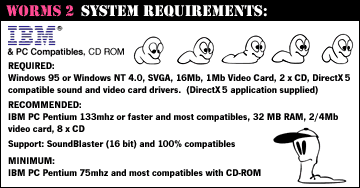
What do I need to play Worms 2?
A mid-90s Windows PC does the job. Here are the original system requirements:
Where can I buy Worms 2?
Worms 2 is available DRM-free from GOG and runs on modern Windows. Original discs also turn up second-hand for a couple of quid.
Sounds
How do I add custom sample sets to Worms 2?
Each sample set lives in its own folder under WORMS\DATA\WAV\SPEACH\. Unzip your files into this directory, making sure you include the folder. The folder name is what appears in the game.
How do I use a custom sample set?
Custom samples can only be used in single- or multi-player games (QuickStart uses the default samples). At the Team Selection menu, right-click your current team - they must be in the bottom window; if the team is in the Player Roster, click them to move them down. Then use the drop-down menu to pick the samples for that team.
How do I make a custom sample set?
Installed with Worms 2 is a program called BANKEDITOR.EXE. Open it, click the sample you want to change, then click Set. Find the sample you want and click Open - a blue bar appears next to any sample with a custom file in place (files without a bar fall back to the original effect; Restore puts the default back). When you're done, click Save As…, name your set and click OK. It's now in the game.